Last Updated on April 26, 2026 by Kravelv Spiegel
💡Key Takeaways:
Smart plug energy monitoring is a feature that measures, records, and displays the exact amount of electricity a plugged-in appliance consumes in real time and over time. Instead of guessing which devices are driving up your electricity bill, energy monitoring gives you precise wattage readings, cumulative kilowatt-hour (kWh) totals, and in many cases, dollar-cost estimates per device.
For heavy appliances like space heaters, window AC units, and dehumidifiers which can each account for 15–25% of a household’s total consumption this data is the difference between blind spending and informed control. Most smart plugs with energy monitoring cost $15–$30, take under five minutes to set up, and pay for themselves within six months through the behavior changes the data enables.
How Does Smart Plug Energy Monitoring Work?
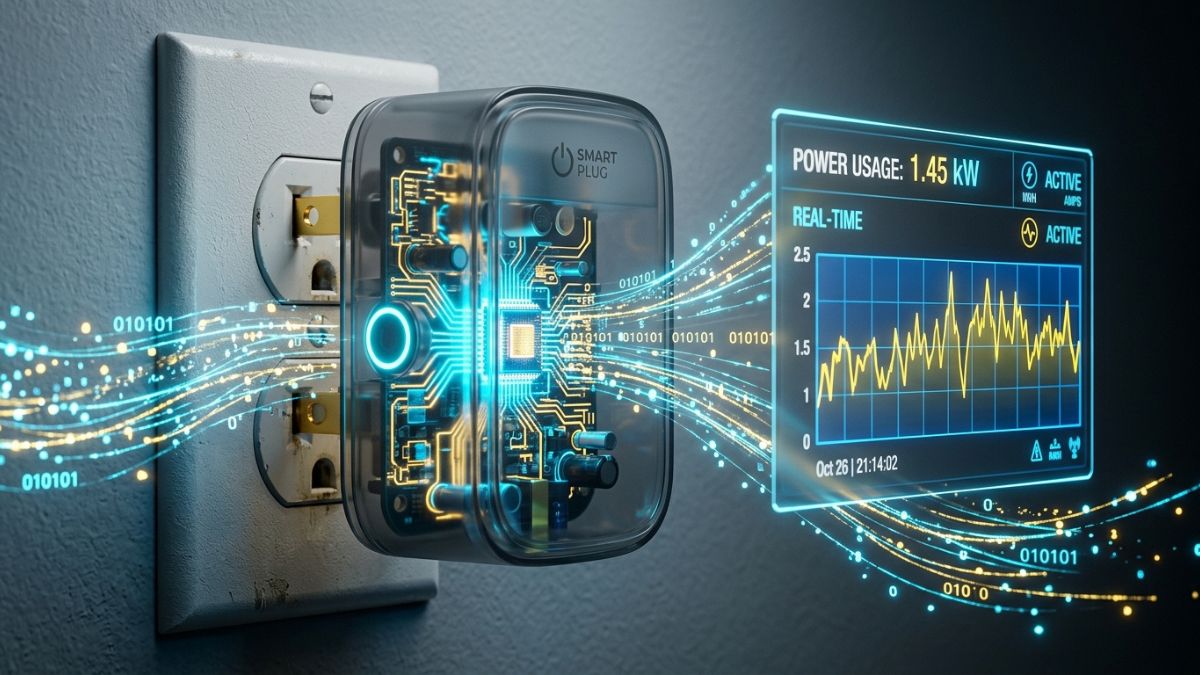
A smart plug with energy monitoring contains a built-in current sensor (also called a current transformer or CT sensor) that sits between the wall outlet and the connected device. As electricity flows through the plug to power your appliance, the sensor continuously measures the current and voltage passing through. The plug’s onboard microprocessor multiplies these two readings to calculate wattage — the real-time power draw — and accumulates those readings over time to calculate kilowatt-hours consumed.
This data is transmitted over Wi-Fi or Bluetooth to the plug’s companion app on your smartphone. Most apps display three core readings: real-time wattage (what the appliance is drawing right now), cumulative kWh (total energy consumed since tracking began), and estimated cost (based on your entered electricity rate). Higher-end models also track voltage, current in amps, and power factor separately.
The accuracy of this measurement varies between models. Budget plugs sometimes report wattage within 10% of actual, which is fine for ballpark estimates. Better models hit 1–2% accuracy, which matters if you’re tracking small phantom loads or calculating ROI on efficiency upgrades.
Why Energy Monitoring Matters for Heavy Appliances Specifically
Not all appliances are worth monitoring equally. A phone charger draws 5–15W and barely registers on your bill. A space heater running at 1,500W is a different category entirely.
A space heater running at 1,500W for one hour uses 1.5 kWh. Run it eight hours a day for a month and you’ve added $57.60 to your bill. Energy monitoring makes that visible before the bill arrives — so you can decide whether to shorten run times, schedule automated shutoffs, or replace an inefficient model.
Heavy appliances also tend to degrade over time. A refrigerator compressor drawing 20% more current than it should, or a window AC unit that runs longer cycles due to a dirty filter, won’t announce itself. Energy monitoring that is accurate enough can spot a failing refrigerator compressor through an anomalous spike in power draw — something you would never catch by feel or by looking at a monthly bill.
What Is the difference between wattage and kilowatt-hours?
Understanding the two core metrics on any energy monitoring display is essential for interpreting the data correctly.
Wattage (W) is the instantaneous power draw — what the appliance is consuming at this exact moment. Think of it like a speedometer. A space heater set to high might show 1,500W. The same heater on low might show 750W. Wattage tells you how hard the appliance is working right now but nothing about how long it has been running.
Kilowatt-hours (kWh) is the accumulated energy consumption over time — power multiplied by hours. A 60-watt lightbulb kept on for two hours would show 120 watt-hours (or 0.12 kilowatt-hours) of consumption. kWh is what your utility company bills you for. A plug that shows only wattage but not kWh is less useful for actual bill management.
Most smart plugs with energy monitoring display both. When buying, confirm the plug tracks cumulative kWh — not just real-time watts — as this is the metric that maps directly to your monthly electricity cost.
What Is Phantom Power and How Much Does It Cost You?
Phantom power, also called standby power or vampire energy is the electricity a device consumes when it appears to be off but remains plugged in. Digital displays, remote-control receivers, network standby functions, and internal clocks all draw continuous low-level power 24 hours a day.
The cumulative cost is significant. Standby power accounts for 5–10% of residential energy use and could cost the average household up to $183 per year. At a national scale, phantom energy collectively costs US households about $19 billion a year and accounts for roughly 44 million metric tons of CO2 dispersed into the atmosphere annually.
Each watt of continuous standby power consumes about 9 kWh of electricity per year. A device drawing just 5W on standby — an older game console, a cable box, a microwave with a clock — adds 45 kWh to your annual bill from doing nothing. Multiply that across the 10–20 always-plugged devices in most homes and the number becomes meaningful.
Smart plugs with energy monitoring identify these phantom loads precisely. Once you know a device draws 8W on standby around the clock, you can schedule the plug to cut power during hours the device won’t be used — eliminating the waste without the inconvenience of manually unplugging it.
How to read your energy monitoring data?
Most energy monitoring apps present data in three views. Understanding what each one tells you helps you act on the information rather than just collect it.
Real-time view shows current wattage at this moment. Use this to verify an appliance is actually off (many aren’t), to compare high vs. low power modes, and to check whether a heavy appliance is drawing more than its rated wattage — a potential sign of a failing component.
Historical view shows kWh consumed over a selected period — today, this week, this month, or this year. Use this to calculate actual operating cost, identify patterns (a dehumidifier that runs 3x longer in July than October), and compare devices against each other.
Cost estimate view converts kWh into dollars based on your entered electricity rate (cost per kWh). This is the most immediately actionable metric. If your space heater costs $58/month to run in winter, you now have a concrete number to optimize against — whether through shorter run times, a programmable schedule, or switching to a more efficient model.
Smart plug energy monitoring vs. whole-home energy monitors
Smart plugs provide device-level monitoring — precise data on individual appliances, one plug at a time. Whole-home monitors like the Emporia Vue 3 install at your electrical panel and track every circuit simultaneously, giving you a complete picture of household consumption without requiring a plug on every device.
A whole-home energy management system covers every circuit and every load in the house, whereas a smart plug is designed to monitor and control an individual appliance or, at most, a handful of appliances plugged into a power strip.
The two approaches complement each other rather than compete. A whole-home monitor tells you that your electricity bill spiked in February — a smart plug tells you it was the space heater in the home office running 12 hours a day. Start with smart plugs on your highest-draw appliances. Add a whole-home monitor if you want to close the gaps on devices that aren’t plug-in accessible, like hardwired HVAC systems and electric water heaters.
Which appliances benefit most from energy monitoring?
Not every device justifies a monitoring plug, but high-draw or always-on appliances deliver the highest return on the data. Here are the appliances where energy monitoring consistently surfaces the most actionable savings:
Space heaters are among the highest-draw portable appliances in most homes, often running 750–1,500W. Monitoring reveals actual run time and helps identify whether a thermostat-controlled model is cycling efficiently or running continuously.
Window and portable AC units draw 900–1,440W depending on BTU rating and compressor cycle. Monitoring surfaces the difference between a well-maintained unit cycling as expected versus a dirty-filter unit running inefficiently for longer periods.
Dehumidifiers run for extended periods in humid months and draw 300–700W. Many households leave them running 24/7 when a 6–8 hour daily schedule would achieve the same humidity target at a fraction of the cost.
Refrigerators and chest freezers run continuously but cycle on and off. A compressor drawing consistently more than baseline wattage is an early warning of impending failure — worth catching before a repair bill or a spoiled freezer of food.
Gaming consoles and entertainment systems are standby power offenders. Entertainment systems, kitchen appliances, and remote-ready devices are among the most common offenders for phantom loads. Monitoring quantifies exactly how much that always-ready game console costs per month.
Workshop and garage equipment — shop vacuums, compressors, battery chargers — often run in spaces where usage is forgotten. A smart plug with scheduling prevents chargers from running overnight indefinitely.
Does energy monitoring actually save money?
The monitoring itself saves nothing — behavior change saves money. But monitoring creates the data that makes behavior change targeted and measurable rather than guesswork.
Smart plugs typically pay for themselves in 6–12 months through identifying phantom power loads. A $20 plug that reveals a standby-hungry device wasting $3/month pays for itself in under seven months. A plug that reveals a space heater running 4 hours longer daily than needed can save considerably more.
The highest-value use of energy monitoring is not catching small phantom loads — it is optimizing the runtime of heavy appliances. A space heater, a window AC unit, or a dehumidifier running one hour less per day adds up to 30+ hours monthly of avoided consumption. At 1,500W, that is 45 kWh saved — worth $7–$10 per month at average US electricity rates, or $84–$120 annually, from a single scheduling adjustment.
On average, households can save $100–$200 annually by eliminating phantom loads alone. Combined with optimized scheduling for heavy appliances, the realistic annual saving for a household that acts on its monitoring data is $150–$300.
How to set up energy monitoring on a smart plug?
Setup is the same regardless of brand — the process takes under five minutes and requires no tools or technical knowledge.
Step 1 — Plug in and connect. Insert the smart plug into a standard wall outlet. Download the companion app (Kasa, Govee Home, BN-HUB, or whichever matches your plug brand). Follow the in-app instructions to connect the plug to your 2.4GHz Wi-Fi network.
Step 2 — Enter your electricity rate. In the app’s energy monitoring settings, input your cost per kWh — this is listed on your electricity bill, usually between $0.10 and $0.25 depending on your state. Without this step, the app shows kWh only, not dollar cost.
Step 3 — Plug in your appliance. Connect the heavy appliance to the smart plug. The app will immediately begin showing real-time wattage. Leave it for 24–48 hours before drawing conclusions — you want to capture a full usage cycle, not just a single reading.
Step 4 — Review and act. After a week of data, compare actual daily kWh and cost against your assumptions. Set schedules or automatic shutoffs based on what you find. Common quick wins: cutting standby power on entertainment systems overnight, setting dehumidifiers to run only during peak humidity hours, and scheduling space heaters to turn off 30 minutes before you typically leave a room.
Frequently asked questions
It measures the electrical current and voltage flowing through the plug to your connected appliance, calculates real-time wattage (power draw right now), and accumulates that into kilowatt-hours over time. Most apps also convert kWh into estimated dollar cost based on your electricity rate.
No. Many smart plugs — including the HBN Smart Plug 15A and BN-LINK Heavy Duty — offer scheduling and remote control but do not include energy monitoring. If tracking power consumption is important to you, specifically look for plugs labeled “with energy monitoring” and confirm the spec sheet lists kWh tracking, not just wattage.
It varies. Budget plugs typically report within 5–10% of actual consumption — accurate enough for identifying major energy hogs and estimating monthly costs. Higher-quality plugs like the Kasa KP115 report within 1–2% accuracy, which is suitable for precise ROI calculations and detecting subtle changes in appliance efficiency over time.
Yes — indirectly. A refrigerator compressor running significantly longer cycles than normal, or a motor drawing 15–20% more current than its rated wattage, will show up as an anomalous increase in daily kWh consumption. Energy monitoring won’t diagnose the fault, but it will tell you something has changed — early enough to investigate before the appliance fails entirely.
No. The plug collects data and enables scheduling, but saving money requires acting on that data. A smart plug that you set and forget in remote-control mode saves nothing. A smart plug whose monitoring data leads you to shorten an appliance’s daily runtime by one hour can save $50–$120 per year on a single heavy appliance.
For heavy appliances (15A/1,800W loads like space heaters and window AC units), the Kasa KP115 and Govee Smart Plug with Energy Monitoring are the top choices — both are 15A-rated, ETL or UL certified, and provide detailed kWh tracking through well-designed apps.
A smart plug monitors one appliance at a time — precise, device-level data. A whole-home energy monitor installs at your electrical panel and tracks every circuit simultaneously, covering hardwired appliances like HVAC, water heaters, and dryers that smart plugs can’t reach. For most households, start with smart plugs on the 3–5 highest-draw portable appliances, then consider a whole-home monitor if you want complete visibility.
Negligibly. A smart plug in active monitoring mode draws approximately 1–2W of standby power itself — about 9–18 kWh per year, worth $1–$2 at average US rates. That cost is recovered the first time the monitoring data helps you identify an appliance worth scheduling.
Final words
Smart plug energy monitoring turns invisible electricity consumption into visible, actionable data. For heavy appliances that draw 1,000W or more — the single largest contributors to most household electricity bills — real-time wattage tracking and kWh accumulation reveal exactly what each device costs to run, when it is running inefficiently, and where scheduling can eliminate waste. The technology costs $15–$30 per plug, takes five minutes to set up, and typically pays for itself within six months through the behavioral changes it enables.
The next step after understanding energy monitoring is choosing the right plug for your specific appliances. For a detailed comparison of the best 15A-rated smart plugs with energy monitoring available on Amazon — including safety certifications, app quality, and honest limitations — see our complete guide: [Best Smart Plugs for Heavy Appliances →]